The tool for options
Multi-Leg Orders in one step
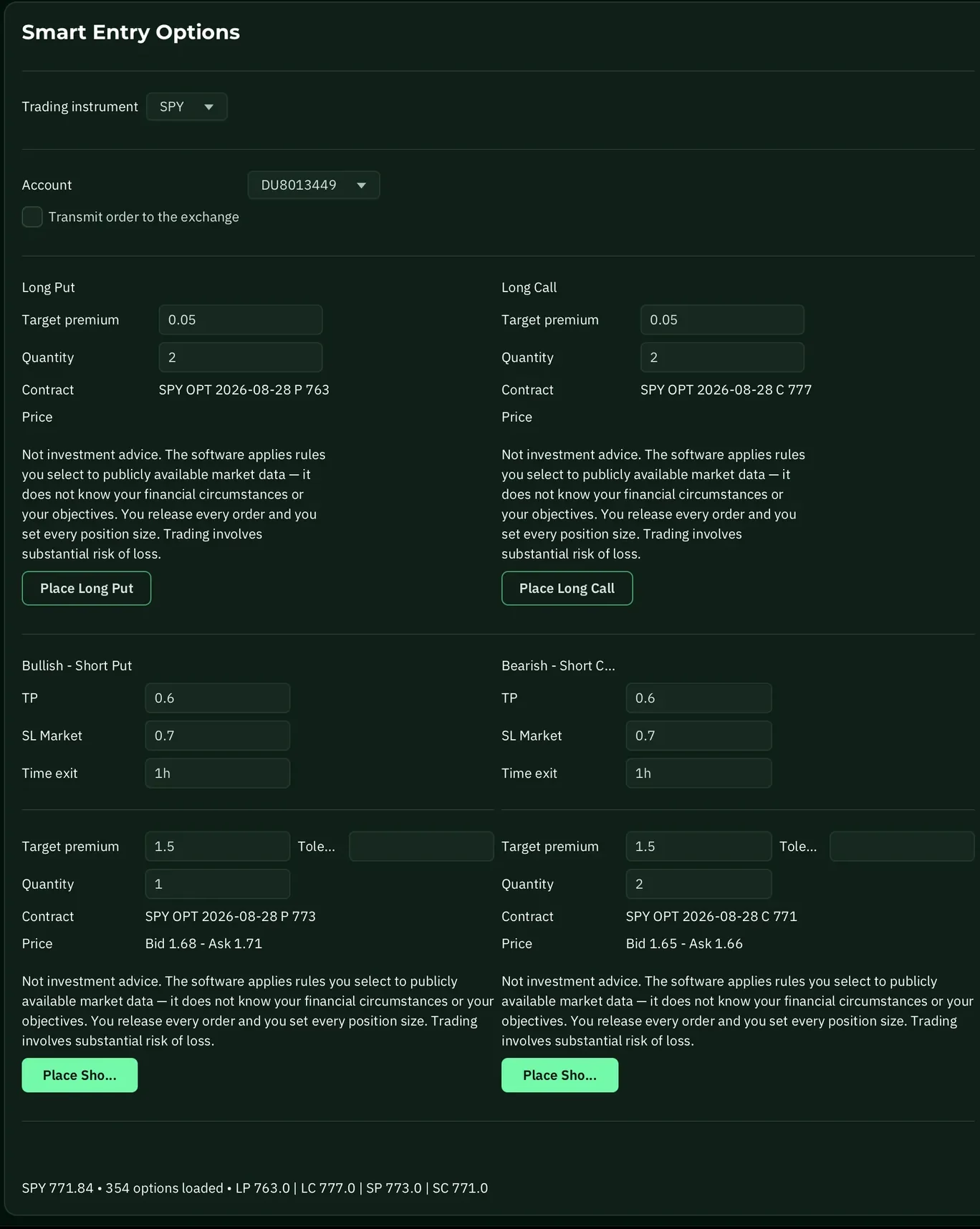
Smart Entry Options searches the option chain by your criteria, finds the long and short legs and places stop, target and time-exit orders – Multi-Leg Orders in one step instead of a chain of entries through the TWS option chains.
It does not trade for you. It builds the order you already have in mind – cleanly and completely.
free · no credit card · upgrade any time
Smart Entry Options
SPYTwo legs, target, stop and time exit – one order.

Where it comes from
Built out of our own trading
Smart Entry Options originally came out of the team, because entering Multi-Leg Orders through the TWS option chains is cumbersome – and in live trading seconds count. Anyone who has an idea and then has to break it down into four input masks loses exactly the window that the idea was worth.
So it is not a tool somebody designed at a drawing board. It makes the operations faster that we carry out ourselves every day.
What it does
Four operations, one step
Legs by your criteria
You define what should be searched for. Smart Entry goes through the option chain and finds the matching long and short legs – instead of you picking them out one by one.
Stop and target right along with it
The protection is not a second thought after the entry, it happens in the same step. Stop and target orders are in place before the position is alive.
Time exit
A timed way out for trades that will not come to anything after a certain period anyway. You set it when you build the order.
One step instead of a chain
What is a sequence of entries through the TWS option chains becomes one order here – complete, with every leg. You are the one who releases it.
Not to be confused
Tool or rule set – who decides?
Smart Entry Options · the tool
You decide what gets traded.
- You bring the idea
- The software finds the legs and builds the order
- No subscription needed – two contracts a day in the Free Plan
An Argon system · the rule set
The software proposes, by a fixed rule set.
- The rule set looks for the entry
- The trade is prepared in front of you
- Subscribed per strategy – the Opening Put, for example
The two work together, but neither requires the other: you can use Smart Entry for your own trades without subscribing to a system – and the other way round. And in both cases the same holds: you are the one who releases it.
Requirements
What you need
Lab of Trades runs on your computer and on your own broker account. Check these four points before you start – the video walks you through the setup in three minutes.
A computer running Windows, Mac or Linux
You install Lab of Trades on it like any other program.
A broker account with the Trader Workstation (TWS) and options trading enabled
With Interactive Brokers or one of its resellers.
API access enabled in the TWS
A checkbox in the Trader Workstation settings. The video shows where to find it.
During trading hours: computer on, TWS and Lab of Trades open
Without a running TWS the software cannot build an order. This also applies with Remote Control: it connects to exactly this computer.
More step-by-step guides are on the tutorials page.
For Smart Entry Options, you also need
- A working understanding of options and their risks – the tool takes operations off your hands, not the decision
Free Plan & subscription
Paid tiers add the SPX
In the Free Plan you trade up to two SPY contracts a day – with no payment details. The paid tiers add the SPX, and the number of contracts per trading day grows with the tier. You keep the SPY in every tier.
no credit card · every trading day · upgrade any time

Free plan
$0
SPY, daily
2 contracts per trading day
No payment details. Every trading day, not just Mondays.
Start for freeSize S
$19
per month · cancel monthly
2 contracts per trading day
SPX on top of the SPY – same index, the bigger contract.
Subscribe to size SSize M
$39
per month · cancel monthly
5 contracts per trading day
The tier for trading regularly on several days a week.
Subscribe to size MSize L
$79
per month · cancel monthly
12 contracts per trading day
For high volume – the number is per trading day, not per trade.
Subscribe to size L- Legs from the option chain, not typed in
- Stop, target and time exit in one step
- Through your own Trader Workstation
Contracts per trading day – not per trade. That is the difference to the Argon systems, where the same numbers cap the contracts per trade. You pick the tier by your trading volume.
Does Smart Entry pick the trades itself?
No. The idea comes from you – Smart Entry carries it out. It goes through the option chain by your criteria and builds a complete order from that. If you want the software to look for the entry itself, you need an Argon system.
What does “2 contracts per trading day” mean?
The number caps how many contracts you can set up through Smart Entry on a trading day in total – not how many go into a single trade. That is the difference to the Argon systems: there the same numbers cap the contracts per trade.
What is the difference between free and paid?
The underlying and the volume. In the Free Plan you trade up to two contracts a day on the SPY, the ETF on the S&P 500. In the paid tiers the SPX is added, the index itself – and more contracts per trading day. The tool itself does the same in both cases.
Do I need a subscription to use Smart Entry?
No. The Free Plan is enough to work with the SPY – with no payment details. You only need a paid tier for the SPX or for more contracts per trading day.
Do I need options trading enabled?
Yes. You can only trade options if your broker has enabled your account for it – you apply for that there, not with us. Which level you need depends on the broker and on the strategy. It is worth sorting out before your first trade; depending on the broker it takes a few days to process.
Which broker do I need?
Smart Entry works together with the Trader Workstation (TWS) – that is where your finished order arrives for release. This works with any broker you use the TWS through: Interactive Brokers itself as well as brokers that work on top of the TWS.
Is this investment advice?
No. Smart Entry is a technical tool – it knows nothing about your personal situation and it does not give recommendations. It does not propose a trade to you either. The decision about what you trade is yours alone.
Important notice: trading options involves substantial risk, including the loss of the capital employed. Smart Entry Options is a tool for order entry and does not make any trading decisions for you.